
Free Freelance Receipt Template
Create professional freelance receipts in under 30 seconds. Free templates with project details, hourly rate tracking, PAID stamp, and delivery.
Download Free Freelance Receipt Template
Get Your Free Freelance Receipt Template
Download in your preferred format. Customize with your logo, colors, and business details. Start issuing professional receipts in minutes.
Microsoft Word
Easy to customize, add your logo
Microsoft Excel
Auto-calculate totals and taxes
Share of small business owners who sell expertise and creative services needing project-based receipts
Time to create and send a professional freelance receipt with Pronto Invoice
Annual payment amount requiring 1099 documentation — freelance receipts create the paper trail
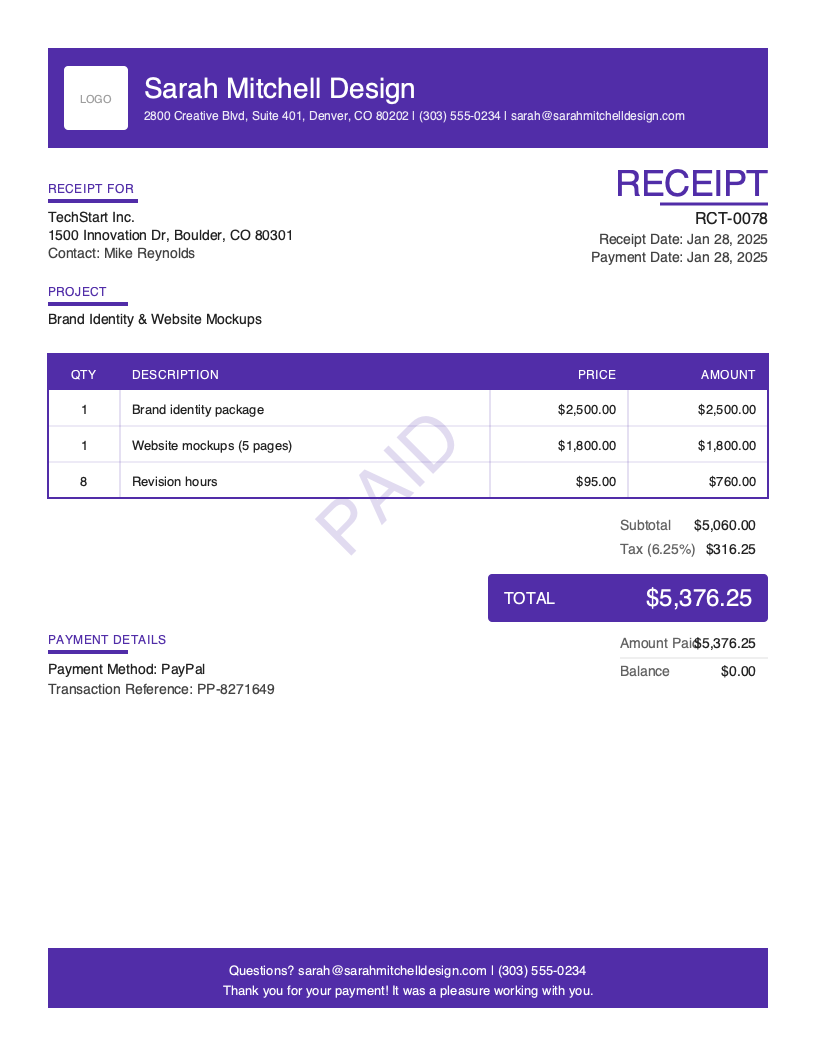
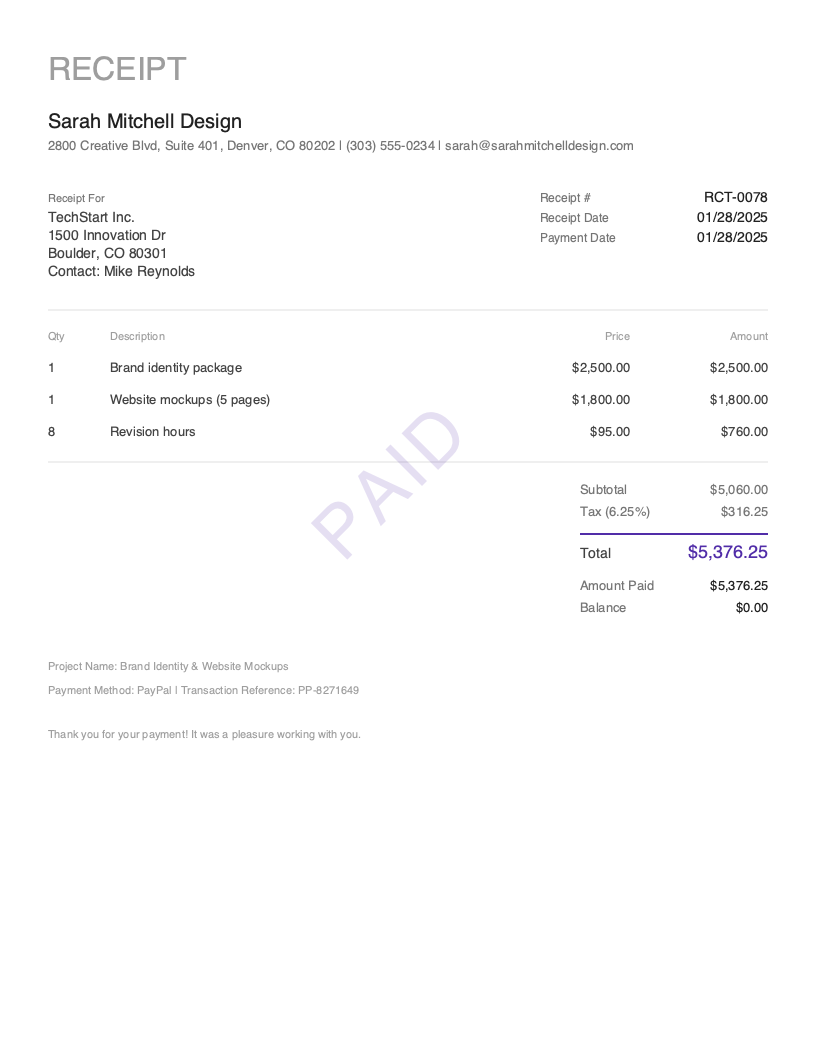
You just delivered a brand identity package and five website mockups for a startup client. The $5,060 PayPal payment hits your account — $2,500 for the brand package, $1,800 for the mockups, and $760 for eight hours of revisions at $95/hour. The client emails: “Got the final files — can you send a receipt?” They need documentation for their business expenses, and you need a record that ties this payment to the project and your hourly rate.
Freelance receipts are built for project-based and hourly-rate work. Unlike a generic sales receipt, a freelance receipt documents the creative or professional project, shows hourly rates alongside fixed-fee deliverables, and confirms that payment was received for completed work. Freelancers who issue professional receipts for every payment build stronger client relationships and spend less time sorting out tax documentation at year-end — every receipt becomes a pre-organized tax record.
The distinction is straightforward: a freelance receipt confirms that payment was received for completed project work. It’s not a proposal, not a scope document, and not an invoice requesting payment. It’s the closing document that says: the work is delivered, the payment landed, and here’s the proof. Every freelance receipt should include a PAID stamp, the project name, your rate structure, and the payment method with transaction reference.
What you’ll find on this page:
- Free downloadable freelance receipt templates (Word & Excel)
- Complete breakdown of required freelance receipt elements
- When and why freelance receipts matter for your business
- Best practices for creative and professional service receipts
- How to create freelance receipts in under 30 seconds
Download Free Freelance Receipt Templates
Get started immediately with our professionally designed freelance receipt templates. Both formats include a PAID stamp, project name field, and flexible line items for hourly and project-based pricing.
| Format | Best For | Download |
|---|---|---|
| Microsoft Word | Easy customization — add your branding, project descriptions, and rate structure | Download Word |
| Microsoft Excel | Auto-calculate hourly totals (hours × rate), project fees, and tax | Download Excel |
Tip: The Excel template includes built-in formulas that calculate hourly work (hours × rate), sum project-based line items, and apply tax. Enter your hours and rate — the receipt handles the math.
Both templates include a PAID stamp, project name field, and mixed pricing structure (hourly + fixed fee) — the elements freelancers need that generic receipt templates don’t support well.
Want more polished designs? Create custom receipts with our receipt generator.
What to Include on a Freelance Receipt
A freelance receipt serves a dual purpose: confirming payment to your client and creating a clean financial record for your own business. Unlike a contractor receipt that focuses on physical materials and job sites, a freelance receipt emphasizes project deliverables, creative work, and time-based billing. Every element should clearly document what was delivered, what it cost, and how payment was made.
Required Receipt Sections
| Section | What to Include | Why It Matters for Freelancers |
|---|---|---|
| Receipt Header | Receipt number (RCT-0001), receipt date, document title “RECEIPT” | Creates a sequential record — essential for tracking multiple clients and projects |
| Business Information | Your name or business name, address, phone, email | Identifies you as the service provider; use your registered business name for tax purposes |
| Client Information | Client company name, contact person, billing address | Links the receipt to a specific client for your records and their expense reporting |
| Project Name | Project description | Freelance-specific — ties the receipt to a defined scope (e.g., “Brand Identity & Website Mockups”) |
| Line Items | Deliverables, hourly work, and fixed-fee items with rates and amounts | Documents what was delivered — the core of a freelance receipt |
| Pricing Summary | Subtotal, tax, total, amount paid, balance ($0.00) | Confirms the full project payment was collected |
| Payment Details | Payment method (PayPal, bank transfer, etc.), transaction reference, payment date | Creates a verifiable trail — freelancers receive payments through many different channels |
| PAID Indicator | Prominent PAID stamp or badge | Immediately communicates the project payment is settled |
| Thank You Message | Brief gratitude and professional close | Leaves a positive impression — freelancers depend on repeat business and referrals |
Critical Freelance Receipt Elements
Project Name and Description Every freelance receipt should clearly identify the project. “Brand Identity & Website Mockups” is far more useful than a list of line items without context. The project name connects the receipt to your proposal, contract, and any previous correspondence. When you file taxes or the client audits their expenses, the project name makes it immediately clear what this payment was for.
Hourly Rate Display Freelancers often bill a mix of hourly and fixed-fee work on the same project. Your receipt should clearly show both: “Revision hours — 8 hrs @ $95/hr = $760” alongside “Brand identity package — $2,500.” This transparency matters because clients budgeting for future projects need to see your rate structure, and your own records need accurate hourly data for pricing future work.
Payment Method and Transaction Reference Freelancers receive payment through more channels than almost any other business type — PayPal, Venmo, Zelle, bank transfer, Stripe, check, even cryptocurrency. Document the exact method and include the transaction reference: “PP-8271649” for PayPal, “ACH-3928174” for bank transfers. When reconciling at month-end, this reference is how you match the receipt to the deposit in your bank account.
Tax Identification If you’re a sole proprietor or LLC, your receipts should include your EIN or note that you operate under your SSN (without printing the actual number). Clients who pay you $600 or more in a year need your tax information for 1099 reporting. Including your business name exactly as registered with the IRS prevents mismatches that trigger IRS notices for both parties.
Understanding Freelance Receipts
When You Need a Freelance Receipt
Freelance receipts apply across all creative and professional service engagements:
Project completion and final payment. You delivered the website mockups, the client approved the final files, and payment arrives. The receipt confirms the project is complete and paid — closing the engagement cleanly.
Milestone payments. Larger projects often split payments across milestones: 50% upfront, 25% at first draft, 25% on delivery. Each milestone payment generates a receipt documenting what was delivered and what was paid at that stage.
Hourly work billing cycles. Consultants and developers billing hourly often send weekly or monthly invoices. When each invoice is paid, the receipt confirms the hours and amount collected for that period.
Client requests for expense documentation. Corporate clients need receipts to process vendor payments through their accounting systems. Even if you already sent an invoice, the client’s finance team may require a separate receipt confirming the payment went through.
Who Uses Freelance Receipts
Freelance receipts map to the creative freelancer persona — the 25% of small business owners who sell expertise and creative services. Photographers, graphic designers, web developers, copywriters, consultants, videographers, social media managers, and marketing strategists all need receipts that document project-based and hourly work.
The key difference from a service receipt is the billing model. Service receipts emphasize labor hours and physical materials for on-site work. Freelance receipts emphasize project deliverables, creative work, and a mix of hourly and fixed-fee pricing — work that’s typically delivered digitally, not at a physical location.
Freelance Receipts vs. Invoices
An invoice says: “I delivered the brand package and mockups. Here’s the breakdown — $5,060 is due within 15 days.” A freelance receipt says: “You paid $5,060 via PayPal on March 1 for the brand package and mockups. Here’s your proof.” Many freelancers invoice first and then send a receipt when payment arrives. Some clients pay immediately on delivery — in that case, skip the invoice and issue a receipt directly. Either approach works; the receipt is what closes the financial record.
Tax Implications for Freelancers
Freelance receipts are your primary income documentation. As a self-employed individual, you report all freelance income on Schedule C. Your receipts create the paper trail: client name, project description, amount received, payment date, and payment method. At tax time, organized receipts make filing straightforward instead of a scramble through bank statements. They also serve as evidence if the IRS questions your reported income — each receipt maps to a specific project and a verifiable payment.
Create Freelance Receipts in Under 30 Seconds
Spreadsheet templates work when you have time. But when a client pays at 11 PM and you want to close the loop before bed, you need something faster. A receipt you can create from your phone in the time it takes to read the payment notification.
Pronto Invoice is built for freelancers who juggle multiple clients and payment methods. Create branded freelance receipts in 5 simple steps.
- Select Client — choose from saved clients or add a new one
- Add Items — pick from saved services (design packages, hourly rates, consultation fees) or enter custom deliverables
- Payment Info — select the payment method used (PayPal, bank transfer, Stripe, Venmo, etc.) and enter the transaction reference
- Document Details — receipt number auto-generates; add project name and any notes
- Review & Send — email the branded receipt to your client instantly
The key difference from invoicing: Step 3 asks “How was this paid?” — not “How can they pay?” You’re confirming a completed payment, not requesting one.
Features for Professional Freelance Receipts
- PAID Stamp — every receipt includes a prominent PAID indicator, automatically applied
- Project Tracking — label receipts by project name for easy searching across clients
- Mixed Pricing — combine hourly and fixed-fee line items on a single receipt with automatic calculations
- Multiple Payment Methods — track PayPal, bank transfer, Stripe, Venmo, Zelle, check, and more — the full range of channels freelancers use
- Auto-Receipt on Payment — if you invoiced first and record payment later, the receipt auto-generates with all project details pre-filled
- Branded Templates — your logo, your colors, your professional identity on every receipt
- Invoice-to-Receipt — convert any paid freelance invoice to a receipt with one tap
- Export for Taxes — export all receipts as CSV for easy Schedule C preparation
Create Your First Freelance Receipt Free →
Related Receipt Templates
Looking for other receipt types? Browse our complete collection:
- Sales Receipt Template — general-purpose receipt for any transaction
- Payment Receipt Template — payment confirmations linked to invoices
- Deposit Receipt Template — retainers and milestone deposits
- Service Receipt Template — labor-based service work
- All Receipt Templates
- Freelancing Invoice Template
- Photography Invoice Template
- Web Agency Invoice Template
- All Invoice Templates
Start Creating Professional Freelance Receipts Today
Every completed project deserves a professional receipt — for your client’s expense records, your tax documentation, and your brand reputation. Pronto Invoice creates branded freelance receipts in under 30 seconds, tracks multiple payment methods, and keeps every receipt organized by client and project for tax season.
Create Free Freelance Receipt → | Download the App →
This guide is for informational purposes only and does not constitute legal or tax advice. Consult with a qualified professional for guidance specific to your situation and jurisdiction.
Last updated: March 2026
Freelance Receipt Best Practices
Send the Receipt Immediately When Payment Clears
The moment payment hits your account — PayPal notification, bank deposit, Stripe confirmation — send the receipt. Prompt confirmation signals professionalism and eliminates 'Did you get my payment?' follow-up emails.
Match Your Receipt to Your Brand
Your receipt is a touchpoint with your client. Use your logo, brand colors, and consistent typography. A generic receipt undermines the professional image you've worked to build.
Use Clean, Professional Formatting
A well-formatted receipt reinforces the quality of your work. It tells the client: this person pays attention to details in everything they do, not just the creative deliverables.
Show Both Hourly and Project-Based Pricing Clearly
Don't combine hourly and fixed-fee work into a single line item. Show 'Website design package — $3,500' separately from 'Additional revisions — 6 hrs @ $95/hr = $570' for full transparency.
Include the Project Name on Every Receipt
Receipts without project context are difficult to match to specific engagements months later. Always include the project name, and if the project has phases, include the phase.
Track Payments Across Multiple Channels
Freelancers often accept PayPal from one client, bank transfer from another, and Stripe from a third. Each receipt should clearly state the payment method and reference number for reconciliation.
Keep Receipts Organized by Client and Year
Create a filing system organized by client and then by date. When tax season arrives, pull all receipts for the year and sort by client for 1099 matching.
Frequently Asked Questions
A professional freelance receipt should include: your business name and contact information, the client's company name and contact details, a unique receipt number (RCT-0001 format), the receipt date, the project name, line items showing deliverables and/or hourly work with rates, subtotal, tax (if applicable), total, amount paid, payment method and transaction reference, and a PAID stamp.
No. An invoice is sent before payment to request money — it includes amounts owed and when they're expected. A receipt is sent after payment to confirm money was received. For freelancers, the typical flow is: deliver work → send invoice → receive payment → send receipt. Some freelancers who receive immediate payment skip the invoice and go straight to a receipt.
There's no universal legal requirement, but issuing receipts is strongly recommended. Receipts serve as your income documentation for taxes, create a professional paper trail for clients, and reduce disputes about whether and when payment was made. Clients paying $600+ need your information for 1099 reporting, and a receipt is the cleanest way to provide it.
Show hourly work as a clear line item: 'Development hours — 12 hrs @ $125/hr = $1,500.' If the project also includes fixed-fee deliverables, list those separately. The receipt should show both the hourly rate and total hours so the client can verify the calculation.
Use a mobile invoicing app like Pronto Invoice. Tap 'New Receipt,' select the freelance receipt type, choose the client, add your deliverables and hourly items, set the payment method with the transaction reference, add the project name, and send. Takes under 30 seconds.
It depends on your state and the type of service. In most states, pure services (consulting, writing, strategy) are not subject to sales tax. However, some states tax digital products (website designs, graphics, photography) or tangible deliverables. Consult a tax professional for guidance specific to your state and service type.
Organize receipts by client and tax year. At minimum, maintain a digital folder structure: 2026 > Client Name > Receipts. Better yet, use a receipt app that auto-stores and categorizes every receipt. At tax time, export all receipts for the year — you'll need the total income per client (for 1099 matching) and the total across all clients (for Schedule C line 1).
Related Receipt Templates
Start Creating Professional Receipts Today
Create your first receipt in under 30 seconds. Join thousands of professionals who use Pronto Invoice to issue receipts on the spot.
This guide is for informational purposes only and does not constitute legal or tax advice.