
Free Payment Receipt Template
Create professional payment receipts in under 30 seconds. Free templates with invoice reference, PAID stamp, and auto-generation on payment.
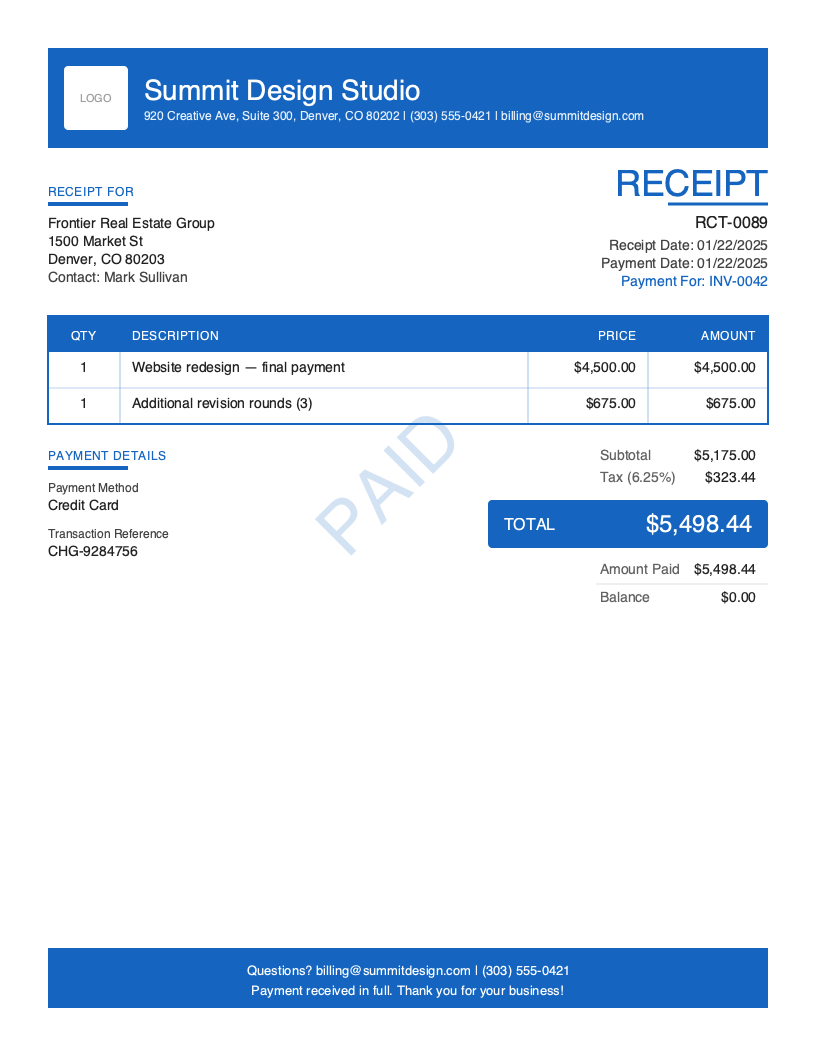
Download Free Payment Receipt Template
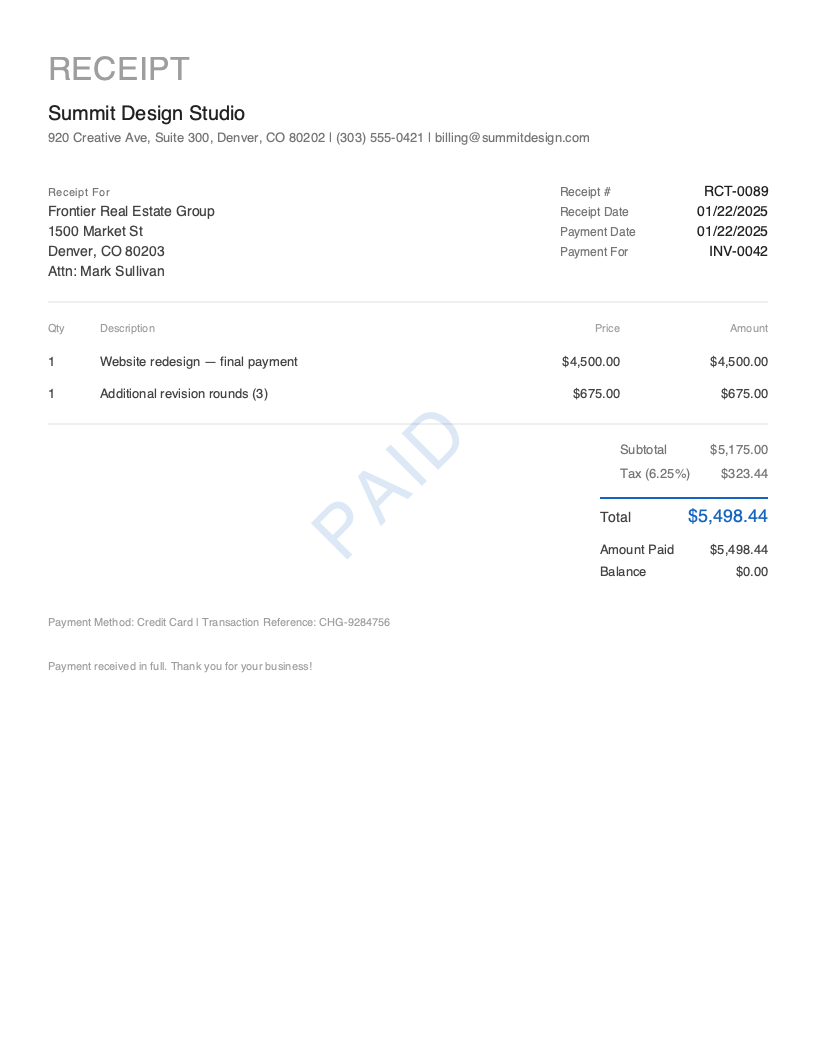
Get Your Free Payment Receipt Template
Download in your preferred format. Customize with your logo, colors, and business details. Start issuing professional receipts in minutes.
Microsoft Word
Easy to customize, add your logo
Microsoft Excel
Auto-calculate totals and taxes
Payment receipts are the most commonly generated receipt type — every paid invoice should produce one
Time to create and send a professional payment receipt with Pronto Invoice — or zero with auto-generation
A payment receipt always closes the invoice completely — amount paid matches total, balance is zero
You sent Invoice #042 to a client three weeks ago. This morning, a $5,175 payment hits your bank account. The client emails: “Payment sent — can you confirm you received it?” Now you need to send back proof that their payment was received, tied directly to the original invoice, showing the exact amount, payment method, and transaction reference. That’s a payment receipt.
Payment receipts are the closing document in the invoice-to-payment cycle. Unlike a sales receipt for a walk-in purchase or a cash receipt for on-site collection, a payment receipt always links back to a specific invoice. It says: “You owed $5,175 on Invoice #042. We received $5,175 via bank transfer on March 1. The balance is now $0.00.” Payment receipts are the most commonly generated receipt type in any invoicing system — every paid invoice should produce one.
The distinction is precise: an invoice requests payment. A payment receipt confirms that the requested payment was received. It closes the loop, zeroes the balance, and gives both parties a matching record. Every payment receipt should include a prominent PAID stamp, the linked invoice number, the payment method and transaction reference, and the exact amount received.
What you’ll find on this page:
- Free downloadable payment receipt templates (Word & Excel)
- Complete breakdown of required payment receipt elements
- When and why payment receipts matter for your business
- Best practices for issuing payment confirmations
- How to auto-generate payment receipts in under 30 seconds
Download Free Payment Receipt Templates
Get started immediately with our professionally designed payment receipt templates. Both formats include a PAID stamp, linked invoice reference field, and transaction details section.
| Format | Best For | Download |
|---|---|---|
| Microsoft Word | Easy customization — add your logo, invoice reference, and business details | Download Word |
| Microsoft Excel | Auto-calculate totals and match payment amount to invoice balance | Download Excel |
Tip: The Excel template includes built-in formulas that pull the invoice total forward and calculate the remaining balance (always $0.00 for a full payment receipt). Enter the invoice number and payment amount — the template confirms the balance is cleared.
Both templates include a PAID stamp, “Payment For: Invoice #___” reference field, and transaction reference — the elements that tie a payment receipt to its source invoice.
Want more polished designs? Create custom receipts with our receipt generator.
What to Include on a Payment Receipt
A payment receipt serves a specific purpose: confirming that payment was received against an existing invoice. It’s not a standalone transaction document — it’s the second half of an invoice-payment pair. Every element should reinforce this connection: the invoice is referenced, the payment matches, and the balance is zero.
Required Receipt Sections
| Section | What to Include | Why It Matters for Payment Receipts |
|---|---|---|
| Receipt Header | Receipt number (RCT-0001), receipt date, document title “RECEIPT” | Creates a unique record separate from the invoice it references |
| Business Information | Company name, address, phone, email | Identifies who received the payment |
| Client Information | Customer name and billing address | Matches the payer to the original invoice recipient |
| Linked Invoice | ”Payment For: Invoice #042” with invoice number | Payment-specific — the defining element that ties this receipt to a source invoice |
| Line Items | Products/services from the original invoice | Documents what the payment covered — carried forward from the invoice |
| Pricing Summary | Subtotal, tax, total, amount paid, balance ($0.00) | Confirms the invoice total was paid in full — balance must be zero |
| Payment Details | Payment method used, transaction reference, payment date | Creates an auditable trail linking the payment to the bank record |
| PAID Indicator | Prominent PAID stamp or badge | Visually closes the invoice — immediately communicates the debt is settled |
| Thank You Message | Brief gratitude message | Professional close to the billing cycle |
Critical Payment Receipt Elements
Linked Invoice Reference This is what makes a payment receipt unique among all receipt types. The “Payment For: Invoice #042” reference creates a direct link between the receipt and its source invoice. Both documents should be traceable to each other — if a client provides Invoice #042 during a tax audit, you can instantly produce Receipt RCT-0089 as proof of payment. Without this link, your payment receipt is just a generic sales receipt.
Transaction Reference Number Payment receipts typically involve electronic payments — credit cards, bank transfers, ACH, PayPal — that generate confirmation codes. Include this reference on the receipt: “TXN-4829173” for card payments, “ACH-7829401” for bank transfers, check numbers for check payments. This number lets both parties verify the payment against bank or processor records. It’s the bridge between your receipt and the financial system.
Payment Method Documentation Unlike a cash receipt (where the method is always “Cash”), payment receipts can involve any payment method. Document the specific method used: credit card, debit card, bank transfer, ACH, PayPal, Zelle, Venmo, check, or wire transfer. For card payments, include the last four digits of the card if available. For bank transfers, include the ACH reference. This detail helps during reconciliation.
Amount Paid Matching Invoice Total A standard payment receipt shows the amount paid matching the invoice total exactly, with a $0.00 balance. If the payment is partial, you’re looking at a deposit receipt instead. If the client overpaid, document the overpayment and your refund or credit policy. The core rule: a payment receipt closes the invoice completely.
Understanding Payment Receipts
When You Need a Payment Receipt
Payment receipts are generated in three primary scenarios:
Invoice payment received. The most common case. You sent Invoice #042 last week, the client pays via credit card or bank transfer, and you issue a receipt confirming the payment. In Pronto Invoice, this happens automatically — record the payment against the invoice, and the receipt generates itself.
Client requests payment confirmation. After paying, many clients proactively ask: “Can you send me a receipt?” or “Can you confirm you received the payment?” A payment receipt answers this immediately with professional documentation.
Accounting reconciliation. At month-end or tax time, you need to match every invoice to a corresponding payment. Payment receipts with linked invoice references make this reconciliation straightforward — each receipt ties directly to the invoice it closes.
Who Uses Payment Receipts
Payment receipts are universal across all business types. Every freelancer, contractor, small business, and service professional who sends invoices and receives payments needs payment receipts. They’re especially important for:
- Freelancers and consultants billing clients on Net 15 or Net 30 terms — the receipt closes the billing cycle
- Contractors receiving progress payments on larger projects — each payment against the invoice gets its own receipt
- Small businesses managing accounts receivable — payment receipts prove that outstanding balances have been collected
- Any business accepting electronic payments — the receipt pairs with the transaction confirmation from the payment processor
Payment Receipts vs. Other Receipt Types
A payment receipt always has a source invoice. A sales receipt or cash receipt can exist independently — no prior invoice required. If a customer walks in, buys something, and pays on the spot, you issue a sales receipt. If you sent an invoice and the customer pays it later, you issue a payment receipt linked to that invoice.
Think of it this way: payment receipts close invoices. Sales and cash receipts document standalone transactions.
Accounting and Tax Implications
Payment receipts are critical for accurate bookkeeping. They move revenue from “accounts receivable” to “received” in your records. For tax purposes, the payment receipt date — not the invoice date — is typically when income is recognized under cash-basis accounting. Keep every payment receipt paired with its source invoice. During an audit, you need to show the complete chain: invoice issued → payment received → receipt generated.
Create Payment Receipts in Under 30 Seconds
Manual payment receipts require copying invoice details, adding payment information, and sending a new document. That’s tedious when you’re processing multiple payments daily. The better approach: let the system handle it.
Pronto Invoice auto-generates payment receipts the moment you record a payment. No copying, no manual entry, no extra steps.
Auto-receipt flow (zero effort):
- Client pays Invoice #042 via credit card
- You record the payment in Pronto Invoice (or it’s detected automatically via Stripe)
- System generates Receipt RCT-0089 with all invoice data pre-filled
- Receipt is emailed to the client automatically (if auto-send is enabled)
- Receipt links back to Invoice #042 in your records
Manual receipt flow (when needed):
- Select Client — pre-filled from invoice, or choose from saved clients
- Add Items — carried forward from the source invoice
- Payment Info — select the payment method used and enter the transaction reference
- Document Details — receipt number auto-generates, linked invoice auto-populated
- Review & Send — confirm and deliver the payment confirmation
Features for Professional Payment Receipts
- Auto-Receipt on Payment — the primary feature. Record a payment, and the receipt generates instantly with all invoice details pre-filled.
- PAID Stamp — every receipt includes a prominent PAID indicator, automatically applied
- Linked Invoice Reference — “Payment For: Invoice #042” is auto-populated, creating a complete audit trail
- Invoice-to-Receipt — open any paid invoice and tap “Generate Receipt” to create a linked payment receipt
- Transaction Reference Tracking — store confirmation codes, check numbers, and ACH references with each receipt
- Multiple Payment Methods — track credit card, bank transfer, ACH, check, PayPal, Zelle, Venmo, and more
- Automatic Email Delivery — enable auto-send and clients receive receipts within seconds of payment
Create Your First Payment Receipt Free →
Related Receipt Templates
Looking for other receipt types? Browse our complete collection:
- Sales Receipt Template — standalone receipts for direct transactions
- Cash Receipt Template — cash payment documentation with signature
- Service Receipt Template — labor and materials breakdown for completed work
- Deposit Receipt Template — partial payments and retainers
- All Receipt Templates
- All Invoice Templates
Start Creating Professional Payment Receipts Today
Every paid invoice deserves a matching receipt — for your records, your client’s records, and your accountant’s sanity. Pronto Invoice auto-generates payment receipts the moment payments are recorded, links them to source invoices, and delivers them to clients within seconds. Zero manual effort, complete audit trail.
Create Free Payment Receipt → | Download the App →
This guide is for informational purposes only and does not constitute legal or tax advice. Consult with a qualified professional for guidance specific to your situation and jurisdiction.
Last updated: March 2026
Payment Receipt Best Practices
Auto-Generate Receipts When Payments Are Recorded
Generate payment receipts automatically the moment a payment is recorded against an invoice. No manual steps, no delays. The receipt pulls all data from the invoice and adds the payment details.
Always Reference the Source Invoice
Never issue a payment receipt without the linked invoice number. 'Payment For: Invoice #042' is the single most important line — it creates the audit trail and makes reconciliation straightforward.
Use Clean, Professional Formatting
A polished payment receipt reflects well on your entire billing process. Clients who receive clean payment confirmations are more likely to pay future invoices promptly.
Include Complete Transaction Details
Include the payment method (credit card, bank transfer, check), the transaction reference number, and the exact payment date. These details allow both parties to verify the payment against bank statements.
Send the Receipt Promptly
The payment receipt should arrive within minutes of payment — not days later. Prompt confirmation builds trust and reduces 'Did you get my payment?' follow-up emails.
Match Receipt Line Items to the Invoice
The line items on your payment receipt should mirror the source invoice exactly. Don't summarize if the invoice listed separate items. Matching line items reinforces that the receipt covers the specific work invoiced.
Keep Receipts and Invoices Paired in Your Records
Store payment receipts alongside their source invoices. The invoice-receipt pair should be instantly retrievable together for accounting and audit purposes.
Frequently Asked Questions
A professional payment receipt should include: your business name and contact information, the client's name and address, a unique receipt number (RCT-0001 format), the receipt date, the linked invoice number ('Payment For: Invoice #042'), line items matching the original invoice, subtotal, tax, total, amount paid, balance ($0.00), the payment method used, a transaction reference number, and a PAID stamp.
No. An invoice is issued before payment — it's a request for money that includes amounts owed and payment instructions. A receipt is issued after payment — it confirms that money was received. A payment receipt specifically confirms that an invoice has been paid, and always references the source invoice number. They're two halves of the same transaction: invoice creates the obligation, receipt closes it.
Yes. Every paid invoice should produce a corresponding payment receipt. It's professional, it's expected by clients, and it creates the documentation trail you need for accounting and taxes. With automated receipt generation, there's zero extra effort.
A payment receipt is always linked to a source invoice — it confirms payment against a specific bill. A sales receipt is standalone — it documents a transaction where no invoice was issued first (walk-in purchases, point-of-sale transactions). If you invoiced the client first and they paid later, use a payment receipt. If payment happened at the time of sale with no prior invoice, use a sales receipt.
With Pronto Invoice, the easiest method is automatic: record a payment against an invoice, and the receipt generates itself. For manual creation, tap 'New Receipt,' select the payment receipt type, choose the client, reference the source invoice, enter the payment method and transaction details, and send. Takes under 30 seconds.
Yes. Payment receipts use their own sequential numbering (RCT-0001, RCT-0002) separate from invoice numbers (INV-0001, INV-0002). This keeps your document types distinct and audit-friendly. The linked invoice reference on the receipt connects the two.
If a client makes a partial payment on an invoice, that's documented with a deposit receipt, which shows the amount paid and the remaining balance. A standard payment receipt implies the invoice is paid in full — amount paid equals the total, balance is $0.00. Once all partial payments are made and the invoice is fully settled, a final payment receipt closes the invoice.
Related Receipt Templates
Start Creating Professional Receipts Today
Create your first receipt in under 30 seconds. Join thousands of professionals who use Pronto Invoice to issue receipts on the spot.
This guide is for informational purposes only and does not constitute legal or tax advice.